My Home Server Talks Back Now
A while back I wrote about building a home server. That post was all Docker containers, DNS, and reverse proxies. The foundation. This post is about what I've started building on that foundation, and it's a little different: the box now does things for me every morning, and I can talk to it from my phone.
The goal I gave myself was loose: an always-on box that smartly automates my life. My laptop isn't always on, so it can't be the thing that runs scheduled jobs. The server is, so that's where this stuff lives.
Step one: get my notes onto the server
Everything I do runs through Obsidian. Daily notes, blog drafts (hi 👋), random lists. So before the server could do anything useful, it needed a copy of my vault that stayed in sync.
The server is headless, just a tty, so I'm using the headless Obsidian Sync client (ob, from npm), running as a systemd user service. It keeps ~/Notes in sync with every other device just like the app would. One rule I learned the easy way (by reading the docs first, for once): never run two sync clients against the same vault on the same machine.
Step two: a morning briefing
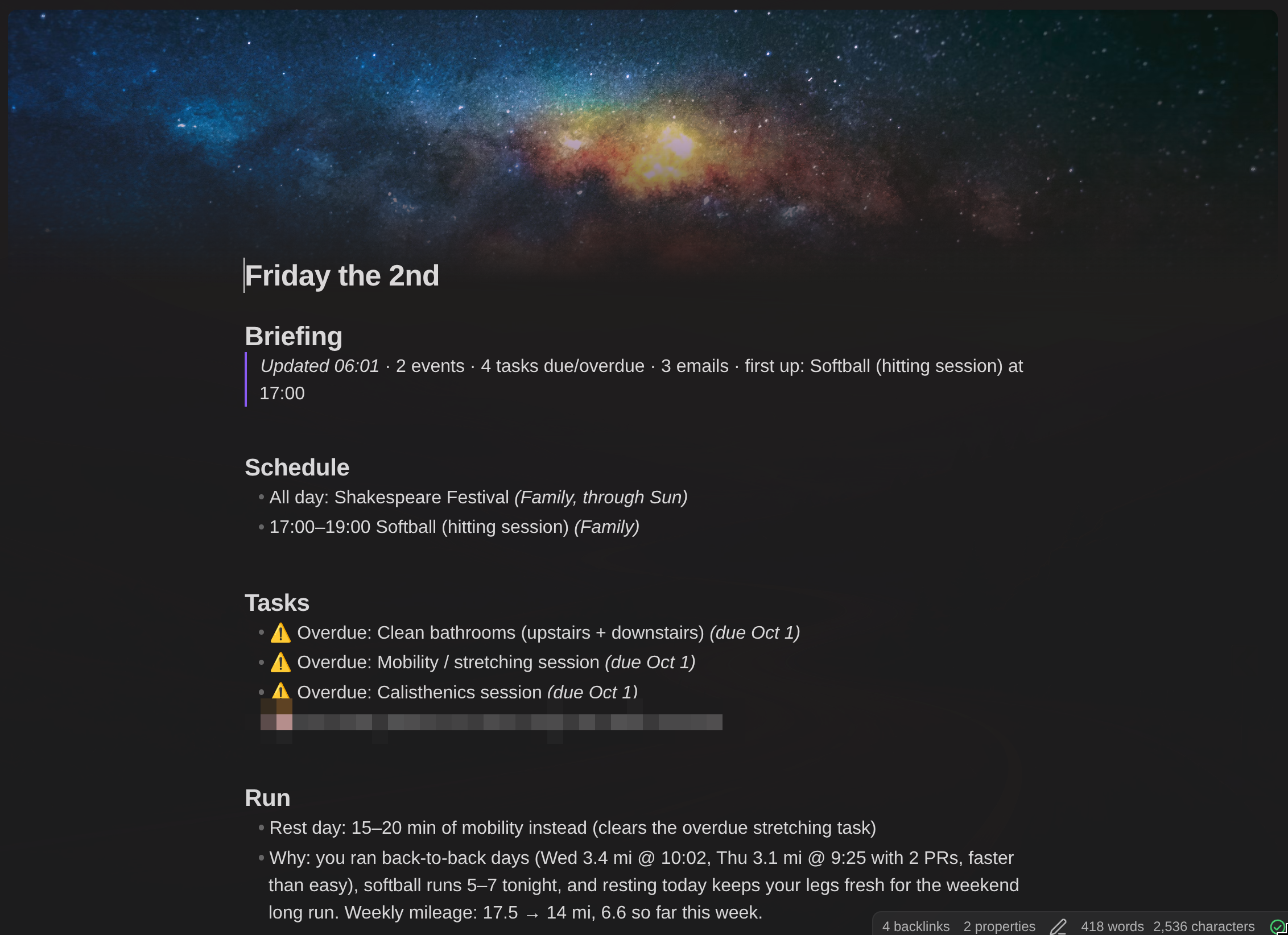
This is the part I actually wanted. Every morning at 6:00, the server writes a briefing into the top of that day's daily note:
- Schedule: my calendar plus the family, kids' sports league, and holiday calendars, de-duplicated
- Tasks: anything overdue, due today, in progress, or blocked
- Email: the last day's inbox triaged down to what actually needs me (real people, bills, school stuff)
- Run: one suggested run, based on my last few weeks on Strava and building toward a half marathon
- Focus: a sentence or two on what actually matters today
Under the hood this is Claude Code running headless. The briefing is a custom slash command (/today), which is just a markdown file in the vault describing what to gather and how to format it. Here's a taste of it (trimmed):
Build today's briefing and write it into today's daily note. This is **read-only**
everywhere except the daily note: never create, update, or delete anything in
Calendar, vTodo, Gmail, or Strava.

**Gmail**: search the last day's inbox and do the triage yourself. Keep:
- mail from actual people
- bills and payments due, failed payments, anything with a deadline
- security alerts that look unexpected (ignore routine "you signed in to X" notices)

Drop newsletters, marketing, receipts for completed payments, and app notifications.
That's the whole trick: plain-English instructions, the way you'd brief a human assistant. A systemd timer runs a tiny wrapper at 6:00 (trimmed a little; the real one also logs and posts a summary to IRC):
#!/usr/bin/env bash
cd ~/Notes
claude -p "/today" --permission-prompts none \
  --allowedTools 'Bash(date:*)' 'Bash(ls:*)' Read Glob Grep \
    'Edit(~/Notes/**)' \
    mcp__claude_ai_Google_Calendar__list_events \
    mcp__claude_ai_vTodo__list_tasks \
    mcp__claude_ai_Gmail__search_threads \
    mcp__claude_ai_Strava__list_activities
The thing I care about most is that it's read-only everywhere except my notes. Every outside tool on that list only reads. It can't send mail, move meetings, or delete tasks. And because it runs with --permission-prompts none, anything not on the list is simply denied. There's nobody awake at 6am to click "allow," and that's the point.
Step three: IRC, because of course
The briefing is nice, but the bigger thing I wanted was to be able to talk to Claude from my phone, like an actual assistant.
Technically I already could: SSH in from my phone, attach to my terminal session, and type into a terminal with a phone keyboard. It's enough friction that I just... don't. What I wanted was a chat app. Open it, type, get an answer. I could've used Telegram or Slack or Discord, but honestly? IRC is perfect for this. It's simple, it's text, there are good clients for every platform, and I get to run all of it myself.
- ngircd: a tiny IRC server that only listens on localhost. This is where the bot and I actually talk.
- soju: a bouncer in front of it. It keeps me connected when my phone isn't, holds the history, and sends push notifications when I get highlighted.
- motd on my Android phone and gamja (a web client from the same developer as soju) on any computer. Both connect to soju, so it's one conversation everywhere.
- irc-bridge: a small script of my own that sits in a few channels as
claude. When I (and only I) say something, it hands the message to Claude Code and posts the reply.
The briefing posts a short summary to #briefing, and since each channel keeps its own conversation going, I can just reply to it. "What was that email from the school about?" works.
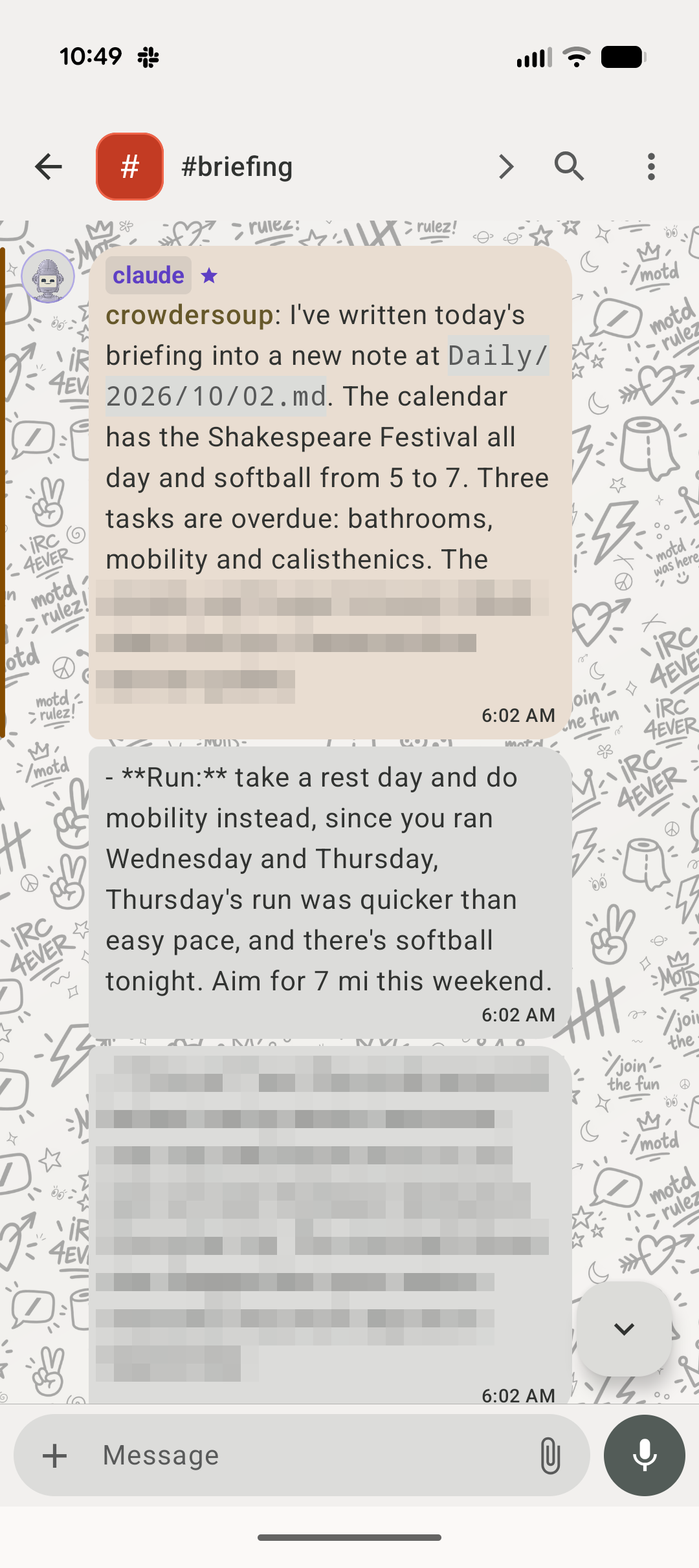
The piece that made it actually usable: approvals over IRC. The bot has an allowlist like the briefing's, but when it wants something that isn't on it, it asks me in the channel and waits for !yes, !no, or !always. That's the difference between a bot I babysit at a terminal and one I can leave running.
What it's actually good for
I've only been using this for about a week and a half, but a few things already feel like they're going to stick:
- Quick questions: "what's on tomorrow?", "what's overdue?", "how did my last run go?"
- Capturing stuff: "note: renew car registration" lands in today's daily note. "Bookmark this" with a link writes a bookmark note with a summary. This might end up being my favorite part.
- Managing my todo list: "add a task to…", "that's done", "move it to Thursday." My task app is still where I glance at what's on my plate. Chat is how I change it.
- Digging through email for one specific thing, like a school trip packet I'd accidentally trashed
- Being a taskmaster. Before a road trip it grilled me through a packing list one item at a time and wouldn't move on until I said "done." I finished two hours early.
- Filing things: I drop a PDF or screenshot into chat, and it reads it, names it, files it next to the right note, and pulls out the useful bits. That school trip packet turned into a trip note with the return time and pickup spot right at the top. The day before publishing this, I sent it two screenshots of my new rec-league basketball schedule. A minute later all seven games were on my calendar, with opponents, a "leave now" reminder for each, and a season note to track results.

What I've learned so far
- It can't edit its own rules. The bot is blocked from its own config, allowlists, scripts, and timers. When it needs a change there, it writes me a to-do with the exact change, and I make it in a separate coding session. Approvals for the small stuff, me for anything that changes what it's allowed to do.
- It makes mistakes, so make them recoverable. It once wrote right over three notes my coding agent had made an hour earlier. Obsidian Sync's version history had them back in a minute, it merged its useful bits into the restored versions, and now it checks before creating a note. Not perfect, but honest, and easy to undo.
What's next
- An evening rollover, and reminders before calendar events
- An MCP server in Webstead, so Claude can draft posts straight to my site, with revisions and undo first. Ideally the next one of these goes out that way.
Two parts of this setup deserve their own posts: an overnight "dreamer" that looks for things I should be doing, and letting it open pull requests on my projects (carefully). Those are next.
The funny thing is that none of the pieces are new. systemd timers, IRC, a sync client, a markdown file. The only new part is the thing in the middle that can read my calendar and write a sentence about it. Everything around it is deliberately old and boring, and I think that's why it works.
Last time the server was a foundation. Now it's starting to feel like a coworker. A quiet one who shows up at 6am and never touches anything they're not supposed to. 😄
Comments
No comments yet.